

Written by the Softwarestech Cloud Engineering Team — reviewed by AWS, Azure and Google Cloud certified solutions architects. Last updated: June 2026.
Every cloud migration project starts the same way: a spreadsheet of servers, a deadline from leadership, and a lot of confidence. Six months in, the projects that succeed are the ones that picked the right migration strategy for each application instead of trying to lift-and-shift everything at once. This guide is the playbook we wish every client had before they signed a contract with AWS, Azure, or Google Cloud.
On This Page

Key Takeaways
- A cloud migration strategy is application-specific: the right approach for your CRM is rarely the right approach for your data warehouse — most migrations mix rehost, replatform, and refactor across the portfolio.
- AWS, Azure, and Google Cloud are all viable, and the “best” provider usually comes down to your existing tooling, your team’s skills, and your AI/ML roadmap rather than raw feature lists.
- Cost savings come from optimization, not the move itself: lifting workloads as-is to the cloud without right-sizing often increases costs in year one.
- A pilot migration de-risks the whole project: moving one or two low-risk applications first surfaces tooling gaps before they affect production systems.
- Security and compliance must be designed in from day one, not bolted on after the migration — identity, encryption, and data residency decisions are far cheaper to get right the first time.
- Migration is the start of an operating model, not a finish line: ongoing FinOps, governance, and architecture reviews are what keep cloud costs under control after go-live.
If your business is still running critical workloads on aging on-premises hardware, or you migrated part of your stack years ago and never finished the job, you’re in good company. Most of the cloud migration projects we run in 2026 aren’t “greenfield” — they’re businesses finishing what they started, modernizing a handful of legacy systems, or correcting course after a rushed lift-and-shift left them with a bigger AWS, Azure, or Google Cloud bill than they expected. A solid cloud migration strategy is what separates a project that reduces cost and improves scalability from one that just moves the same problems to a new data center owned by someone else. Let’s walk through what cloud migration actually involves, how to choose between AWS, Azure, and Google Cloud, and the step-by-step process we use with clients.
What Is Cloud Migration?
Cloud migration is the process of moving applications, data, and IT infrastructure from on-premises servers (or from one cloud platform to another) into a public cloud environment such as AWS, Microsoft Azure, or Google Cloud. It covers everything from moving a single database to a managed service, to relocating an entire data center’s worth of applications, storage, and networking into a cloud provider’s infrastructure.
In practice, “cloud migration” is rarely a single event. It’s a portfolio of decisions made application by application: which workloads move first, which ones get rebuilt instead of lifted, which data needs to stay in a specific region for compliance reasons, and which legacy systems are finally retired instead of migrated at all. A cloud migration strategy is the document — and the decision framework — that ties all of those individual choices together so the end result is a coherent, well-governed cloud environment rather than a collection of disconnected workloads that happen to run on the same provider.
Migration vs. Modernization
It’s worth separating two terms that often get used interchangeably. Migration is about where a workload runs — moving it from on-prem hardware to cloud infrastructure. Modernization is about how a workload is built — adopting managed databases, containers, serverless functions, or microservices instead of monolithic, server-bound architectures. You can migrate without modernizing (a straight lift-and-shift), and in some cases you can modernize without a full migration. But the biggest gains in cost, scalability, and reliability usually come when migration and modernization happen together, even if modernization rolls out in phases after the initial move.
Why Businesses Are Moving to the Cloud
The reasons businesses migrate to the cloud in 2026 are more practical than they were a decade ago. Few companies are migrating just to “be in the cloud” — most have a specific business driver. Here are the ones we see most often.
- Aging hardware and data center contracts: servers reaching end-of-life or a data center lease coming up for renewal is one of the most common migration triggers — it forces a decision rather than letting infrastructure quietly age in place.
- Scalability for variable demand: retail, media, and SaaS businesses with seasonal or unpredictable traffic spikes can’t economically over-provision on-prem hardware for peak load that only happens a few weeks a year.
- Reducing capital expenditure: moving from large upfront hardware purchases (CapEx) to consumption-based pricing (OpEx) frees up cash and shifts infrastructure costs to align with actual usage.
- Access to managed services: managed databases, load balancers, and Kubernetes services reduce the operational burden on internal IT teams who would otherwise spend significant time on patching, backups, and capacity planning.
- AI and analytics workloads: training or running AI models, or running large-scale analytics, increasingly requires GPU and TPU capacity that most businesses can’t justify owning outright. This is closely tied to broader shifts in how AI is transforming modern businesses.
- Business continuity and disaster recovery: cloud regions and availability zones make it dramatically easier to build resilient, geographically distributed systems than maintaining a second physical data center.
- Mergers, acquisitions, and divestitures: combining or separating IT environments is often faster in the cloud, where new accounts and environments can be provisioned in minutes rather than months.
Not every driver applies to every business, and that’s exactly the point — your cloud migration strategy should be built around your actual reasons for moving, because those reasons shape which workloads get prioritized, which provider fits best, and how aggressive your timeline should be.
AWS vs Azure vs Google Cloud: Which Should You Choose?
This is the question we get asked in almost every first conversation, and the honest answer is that all three major providers — AWS, Microsoft Azure, and Google Cloud — are mature, reliable platforms capable of running enterprise workloads at scale. The right choice depends far more on your existing environment, your team’s skills, and your roadmap than on any single feature comparison. Here’s how they generally stack up for the decisions that matter during a migration.
| Factor | AWS | Microsoft Azure | Google Cloud |
|---|---|---|---|
| Core strength | Broadest service catalog and largest partner/tooling ecosystem | Deep Microsoft 365 / Active Directory integration, strong enterprise agreements | Data analytics (BigQuery), AI/ML (Vertex AI, TPUs), Kubernetes origin (GKE) |
| Best-fit scenario | Teams wanting the widest range of managed services and third-party support | Organizations already standardized on Windows Server, SQL Server, or M365 | Data-heavy, AI-driven products and container-native architectures |
| Migration tooling | AWS Application Discovery Service, MGN, Database Migration Service | Azure Migrate (assessment + replication in one tool) | Migration Center, Database Migration Service |
| Pricing model | On-Demand, Reserved Instances, Savings Plans, Spot | Pay-as-you-go, Reserved Instances, Hybrid Benefit for Windows/SQL licensing | Pay-as-you-go with automatic sustained-use discounts, Committed Use Discounts |
| Learning curve | Steeper, due to the sheer breadth of services | Familiar for Windows/.NET-heavy teams | Generally considered the most developer-friendly console and CLI |

In our experience, the deciding factor is rarely “which cloud is technically better” — it’s usually one of three things: where your team’s existing skills sit, what your software vendors already integrate with (an ERP vendor with a certified Azure deployment, for example), or which provider’s enterprise agreement your procurement team can negotiate the best terms on. If you’re choosing a provider partly based on AI workloads, it’s worth reading our broader look at cloud computing trends in 2026, since GPU and managed AI service availability is increasingly a tiebreaker.
Types of Cloud Migration
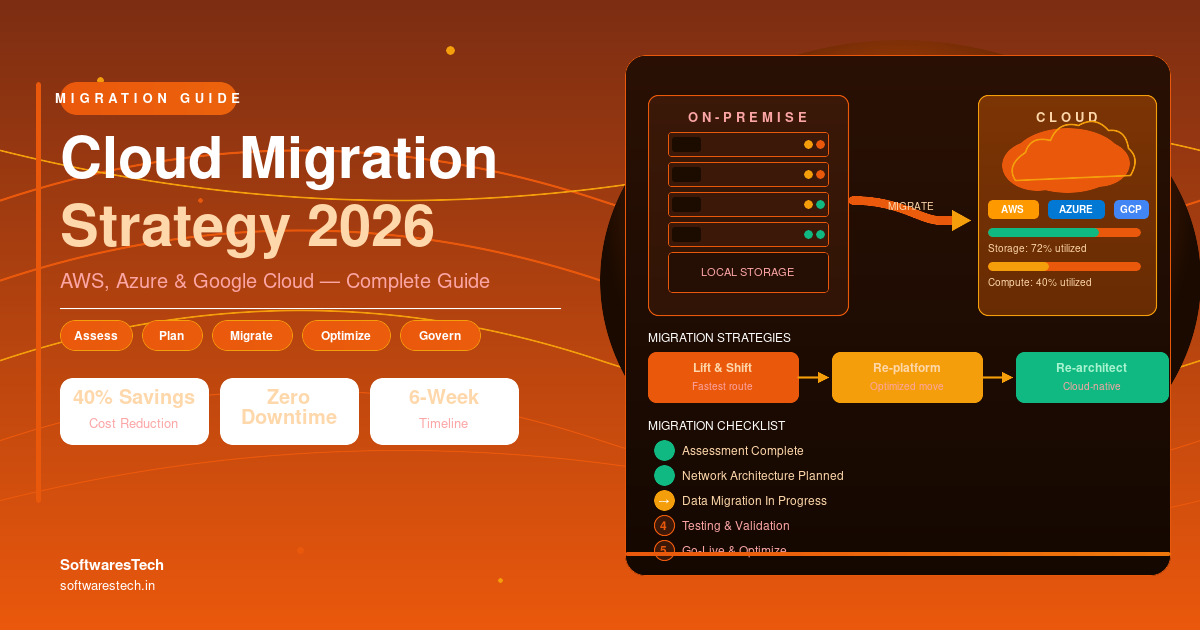
Not every application should be migrated the same way. The three approaches below — often called the “3 Rs” — represent increasing levels of effort, but also increasing levels of long-term benefit. Most real migrations use a mix of all three across the application portfolio.
1. Rehosting (“Lift and Shift”)
Rehosting means moving an application to the cloud with little or no change to its architecture — essentially running the same virtual machines on AWS EC2, Azure Virtual Machines, or Google Compute Engine that used to run on physical servers. It’s the fastest path to the cloud and the lowest-risk option from a technical standpoint, which makes it a common choice for the first wave of a migration or for applications nearing end-of-support that need to move quickly.
The trade-off is that rehosting alone rarely reduces costs on its own — you’re often paying for the same inefficiencies you had on-prem, just on someone else’s hardware. It’s best treated as a starting point, with right-sizing and managed-service adoption planned as a fast follow rather than skipped entirely.
2. Replatforming (“Lift, Tinker, and Shift”)
Replatforming makes a handful of targeted optimizations during the move — without a full rearchitecture. The most common example is migrating a self-managed database running on a virtual machine to a managed database service like Amazon RDS, Azure SQL Database, or Cloud SQL. The application code barely changes, but you immediately offload patching, backups, and failover to the cloud provider.
Replatforming is often the sweet spot for mid-sized businesses: it delivers a meaningful reduction in operational overhead and a real (if moderate) cost benefit, without the time and risk of a full refactor. Containerizing an application that previously ran directly on a VM — without changing its internal architecture — is another common replatforming move that sets the application up for easier scaling later.
3. Refactoring (“Re-architecting”)
Refactoring means rebuilding an application to take full advantage of cloud-native capabilities — breaking a monolith into microservices, adopting serverless functions for event-driven workloads, or redesigning data storage around cloud-native databases and object storage. This is the most expensive and time-consuming path, but it’s also the one that unlocks the biggest long-term gains in scalability, resilience, and cost efficiency, particularly for applications with unpredictable or rapidly growing usage.
Refactoring should be reserved for applications where the business case clearly justifies the investment — usually core, customer-facing products or systems where scaling limitations are already causing problems. For internal tools or applications nearing replacement anyway, the cost of refactoring rarely pays back. If a refactor overlaps with a broader rebuild of your software, it’s worth reviewing our modern software development lifecycle guide to align the migration timeline with your development process.
Typical Mix Across a Mid-Sized Migration
- •~45% Rehost — quick wins, end-of-life servers, low-complexity apps
- •~35% Replatform — managed databases, containerized services
- •~15% Refactor — core products with scaling or performance issues
- •~5% Retire or Repurchase — apps decommissioned or replaced with SaaS
Step-by-Step Cloud Migration Process
Here’s the process we walk clients through for a structured, low-drama migration — whether the target is AWS, Azure, or Google Cloud. The phases overlap in practice, but the order matters: skipping the assessment phase to “save time” is the single most common cause of mid-migration surprises.

Step 1: Assess and Plan
Build an honest inventory of every application, its dependencies, current resource utilization, licensing constraints, and business criticality. Tools like AWS Application Discovery Service, Azure Migrate, or Google’s Migration Center automate much of this discovery by scanning your existing environment, but someone on your team needs to validate the results against institutional knowledge — automated tools miss context like “this server only matters during quarterly close.” This phase also establishes your cost baseline, so you have a real number to measure savings against later.
Step 2: Choose a Migration Strategy Per Application
Using the inventory from Step 1, categorize each application as rehost, replatform, refactor, retire, or repurchase (replace with a SaaS alternative). This is also when you select your target cloud provider — or confirm a multi-cloud approach if different workloads have different needs. Document the decision and the reasoning for each major application; this becomes the reference point when priorities inevitably get questioned later in the project.
Step 3: Run a Pilot Migration
Pick one or two lower-risk applications and migrate them first. This isn’t just technical validation — it’s about giving your team hands-on experience with the migration tooling, identifying gaps in monitoring and access management, and building organizational confidence before tackling business-critical systems. A good pilot candidate is important enough that the team takes it seriously, but not so critical that a hiccup causes a business disruption.
Step 4: Migrate and Validate in Waves
With lessons learned from the pilot, move through the remaining applications in waves, grouped by dependency — applications that talk to each other should generally move together or in quick succession to avoid latency penalties from cross-environment traffic during a partial migration. Every wave should include a validation step: functional testing, performance comparison against the on-prem baseline, and a rollback plan in case something doesn’t behave as expected post-migration.
Step 5: Optimize and Govern
Migration isn’t the finish line — it’s the starting point for continuous optimization. This is where right-sizing, reserved capacity commitments, security posture reviews, and resource tagging for cost allocation happen on an ongoing basis. Companies that treat “we migrated” as a completed project, rather than an operating model, are the ones we tend to see with runaway cloud costs twelve months later.
Throughout this process, having an experienced partner review architecture decisions can prevent costly missteps — this is one of the most common reasons companies bring in outside IT consulting support for a migration rather than relying solely on internal teams who may not have run a large-scale migration before. If the migration touches core business systems like ERP or CRM platforms, it’s also worth reading our guide on enterprise software solutions before finalizing the sequencing plan, since moving the wrong system first can stall an entire wave.
Common Migration Challenges
Even well-planned migrations run into friction. Here are the challenges that come up most often, and how to plan around them.
- Incomplete application inventory: “shadow IT” systems and undocumented dependencies surface mid-migration, causing scope creep. Mitigate by combining automated discovery tools with interviews across departments, not just IT.
- Data transfer time and cost: moving large volumes of data over the internet can take days or weeks and incur egress charges. For large datasets, offline transfer appliances (AWS Snowball, Azure Data Box, Google Transfer Appliance) are often faster and cheaper than network transfer.
- Downtime during cutover: business-critical systems often can’t tolerate extended downtime. Strategies like database replication with a final delta sync, or blue-green cutovers, minimize the outage window to minutes rather than hours.
- Skills gaps on the internal team: cloud platforms require different operational skills than on-prem infrastructure. Budget for training time, or bring in external expertise for the migration itself while your team upskills in parallel.
- Licensing complications: some on-prem software licenses don’t transfer cleanly to cloud VMs, or are priced differently in the cloud. Audit licensing terms for major software (databases, ERP systems, monitoring tools) before finalizing the migration plan.
- Underestimating dependency mapping: an application that looks self-contained often has hidden dependencies on shared file servers, authentication systems, or batch jobs running on other servers. Moving it in isolation can break things that worked fine on-prem.
- Cost surprises post-migration: without right-sizing, cloud bills can exceed on-prem costs in the first few months. This is addressed directly in cost optimization, covered next.
Cost Optimization Best Practices
One of the most common misconceptions about cloud migration is that moving to the cloud automatically reduces costs. It doesn’t — at least not by default. A lift-and-shift migration that simply recreates your on-prem footprint in the cloud, with the same number of always-on servers sized for peak capacity, often costs more than on-prem in the first year. The savings come from the optimization work that happens during and after the migration.

- Right-size before and after migration: on-prem servers are often sized for worst-case demand “just in case.” Use utilization data from the assessment phase to choose instance sizes that match actual usage, not historical over-provisioning.
- Commit to reserved capacity for steady-state workloads: AWS Savings Plans, Azure Reserved Instances, and Google Cloud Committed Use Discounts can cut compute costs by 30-60% for workloads that run continuously, in exchange for a 1-3 year commitment.
- Use auto-scaling for variable workloads: instead of running enough capacity for peak load 24/7, configure auto-scaling so capacity matches demand throughout the day — this is one of the biggest advantages over on-prem hardware.
- Tag everything from day one: resource tags by team, project, environment, and cost center make it possible to allocate costs accurately and spot anomalies quickly. Retrofitting tagging after the fact is far more painful than building it in from the start.
- Decommission what you’re replacing: a surprising number of organizations migrate a workload to the cloud and then forget to turn off the old on-prem server, paying for both environments for months.
- Review storage tiers regularly: data that’s accessed infrequently belongs in lower-cost storage tiers (S3 Glacier, Azure Cool/Archive Blob Storage, Google Cloud Coldline). Automated lifecycle policies can move data between tiers without manual intervention.
- Establish a FinOps review cadence: a recurring (weekly or biweekly) review of cloud spend during and immediately after migration catches cost creep before it becomes a budget problem. For a deeper look at this discipline, see our guide on AWS EC2 cost optimization.
Most organizations we work with find 20-35% in savings opportunities during an initial post-migration cost audit — primarily from right-sizing, eliminating unused resources, and committing to reserved capacity for predictable workloads. The biggest single savings usually come from that first thorough audit, with ongoing FinOps practices preventing costs from creeping back up afterward.
Security and Compliance Considerations
Security and compliance decisions made during a migration are far cheaper to get right than to retrofit afterward. The cloud shifts some security responsibilities to the provider, but identity management, data protection, and configuration remain squarely the customer’s responsibility under the shared responsibility model that AWS, Azure, and Google Cloud all use.
- Identity and access management (IAM): migration is the ideal time to move away from shared admin accounts and implement role-based access control with least-privilege permissions. Map out who needs access to what before recreating accounts in the cloud, rather than copying over years of accumulated permissions.
- Data encryption: enable encryption at rest and in transit for all migrated data by default. Most managed services enable this with a single configuration setting, but it needs to be explicitly verified — it’s not always on by default for self-managed resources.
- Data residency and sovereignty: if your business operates in the EU, UK, or other regions with data residency requirements, confirm which cloud regions your data will live in before migration, not after. Moving data across regions later is disruptive and sometimes contractually restricted.
- Network architecture: design your virtual network (VPC/VNet) topology, security groups, and firewall rules deliberately rather than recreating a flat on-prem network in the cloud. Segmentation that wasn’t practical on-prem often becomes straightforward in a cloud environment.
- Continuous configuration monitoring: cloud security posture management (CSPM) tools continuously scan configurations — IAM permissions, storage bucket settings, security groups — against best-practice baselines, flagging misconfigurations in near real-time rather than during an annual audit. Given how often cloud breaches stem from misconfiguration rather than sophisticated attacks, this is close to essential.
- Compliance frameworks: if your business is subject to frameworks like SOC 2, HIPAA, PCI-DSS, or ISO 27001, confirm which compliance certifications your target cloud services hold and what configuration is required on your end to maintain compliance post-migration.
If you haven’t had a security architecture review in the last 12-18 months, a migration is a natural point to schedule one. This connects closely with broader cybersecurity practices that go beyond cloud configuration alone — covering everything from endpoint security to incident response planning.
How Softwarestech Helps Businesses Migrate to Cloud
Softwarestech works with businesses across every stage of the cloud journey — from a first cloud readiness assessment through pilot migrations, full-scale workload migration, and ongoing cost optimization and governance. Our certified AWS, Azure, and Google Cloud architects bring hands-on migration experience across industries including retail, logistics, finance, and SaaS.
- Cloud readiness assessment: a structured review of your current environment, application dependencies, and licensing to produce a realistic migration roadmap and cost baseline.
- Migration strategy and provider selection: application-by-application recommendations on rehost, replatform, or refactor, plus guidance on choosing AWS, Azure, Google Cloud, or a multi-cloud approach based on your specific workloads.
- Pilot and full migration execution: hands-on migration of pilot applications followed by wave-based migration of the remaining portfolio, with validation and rollback planning built into every wave.
- Cost optimization and FinOps: right-sizing, reserved capacity planning, tagging strategy, and ongoing cost reviews to ensure the savings projected during planning actually materialize post-migration.
- Security and compliance hardening: IAM design, encryption configuration, network segmentation, and continuous configuration monitoring aligned to your compliance requirements.
- Post-migration support and governance: ongoing architecture reviews, monitoring setup, and governance frameworks so your cloud environment stays well-managed long after go-live.
Whether you’re migrating a single application or an entire data center, our team can plug in at whichever stage you need — from a focused cost-optimization engagement on an environment you’ve already migrated, to owning the entire migration program end to end.
Frequently Asked Questions
How long does a cloud migration typically take?
For a company with 50-150 applications, a full migration typically takes 6-18 months from initial assessment to substantially complete, though optimization continues indefinitely afterward. Smaller, focused migrations — a single major application or a specific data platform — can often be completed in 6-12 weeks.
Which cloud provider is cheapest for migration?
There’s no universal answer — list prices for compute and storage are broadly comparable across AWS, Azure, and Google Cloud, and actual costs depend far more on how well workloads are optimized than on the provider chosen. Existing licensing agreements (for example, Microsoft Enterprise Agreements with Azure Hybrid Benefit) can meaningfully shift the calculus for organizations already invested in a particular ecosystem.
Should we migrate everything at once or in phases?
Phased, wave-based migration is almost always the better approach. A pilot wave with one or two low-risk applications surfaces tooling and process gaps before they affect business-critical systems, and grouping subsequent waves by application dependency avoids latency and connectivity issues during the transition period.
Will cloud migration definitely reduce our costs?
Not automatically. A straight lift-and-shift without right-sizing, reserved capacity, and ongoing FinOps practices can cost more than on-premises infrastructure in the first year. The cost reduction comes from the optimization work — right-sizing, auto-scaling, reserved commitments, and decommissioning replaced infrastructure — that should be planned as part of the migration, not treated as an afterthought.
Do we need a multi-cloud strategy?
For most mid-sized businesses, no — a single primary cloud provider with strong governance is simpler to manage and staff for than running production workloads identically across multiple providers. A “primary cloud plus targeted secondary use” approach (for example, running disaster recovery or a specific analytics workload on a second provider) can deliver resilience benefits without the full operational overhead of true multi-cloud parity, which is usually reserved for companies with strict regulatory mandates.
What should we do with our old on-premises hardware after migration?
Plan for decommissioning as part of the migration timeline, not as a separate later project. Keep a short overlap period for rollback safety on critical systems, but set a firm decommission date — indefinitely running both environments “just in case” is one of the most common sources of unexpected post-migration costs.
Further Reading
- Cloud Cost Optimization Best Practices
- Cloud Computing Trends 2026
- AWS EC2 Cost Optimization Guide 2026
For industry benchmarks and additional context, we recommend the AWS Cloud Migration Resources.
Final Thoughts
A cloud migration strategy isn’t a single document you write once and file away — it’s a decision framework that should guide every application’s move to AWS, Azure, or Google Cloud, and continue to guide how your cloud environment evolves afterward. The businesses that get the most out of their migration are the ones that match the right migration type to each application, choose a provider based on real fit rather than hype, and treat cost optimization and security as ongoing disciplines rather than one-time tasks.
If you’re still running significant workloads on-premises, or you started a migration that never quite finished, 2026 is a reasonable time to revisit the plan — cloud pricing models, managed services, and AI/ML capabilities have all matured significantly, and the cost of delaying (continued hardware refresh cycles, growing technical debt, and competitive disadvantage) usually outweighs any benefit from waiting.

Need Help Migrating Your Applications to AWS, Azure, or Google Cloud?
Contact Softwarestech for a free cloud assessment — our certified architects will review your environment, recommend the right migration strategy for each workload, and build a roadmap focused on reducing costs and improving scalability.
Get Your Free Cloud AssessmentNeed Help Building Your Next Digital Product?
From web and mobile apps to cloud infrastructure and AI-powered platforms — our engineers can help you plan, build and scale with confidence.
Related Articles
Enterprise Cloud Optimization Services in 2026: The Complete Infrastructure Guide
As digital transformation accelerates across every industry, modern enterprises face a double-edged sword: cloud environments offer unparalleled agility, yet unmanaged cloud infrastructure quickly leads...

High-Performance Cloud Optimization in 2026: The Complete Enterprise Infrastructure Guide
As digital transformations accelerate across every industry, organizations face a double-edged sword: the cloud offers unparalleled agility, yet unmanaged cloud infrastructure quickly leads to...
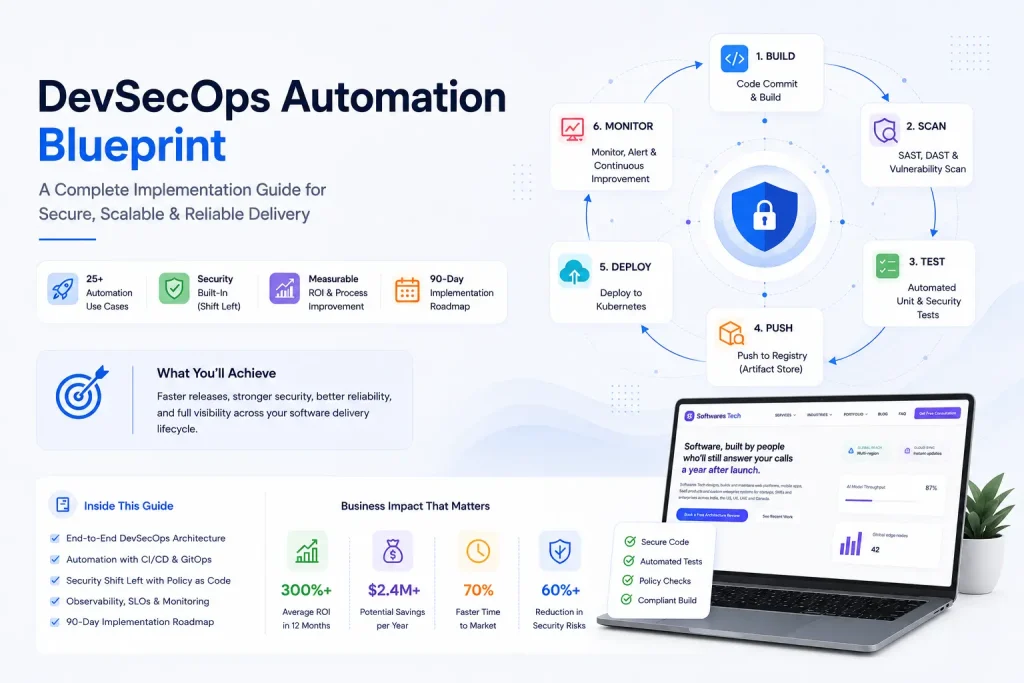
DevOps Best Practices in 2026: From CI/CD to Production Monitoring
If you've spent any real time on call, you already know that "DevOps" stopped being a job title years ago and became a shared...
