

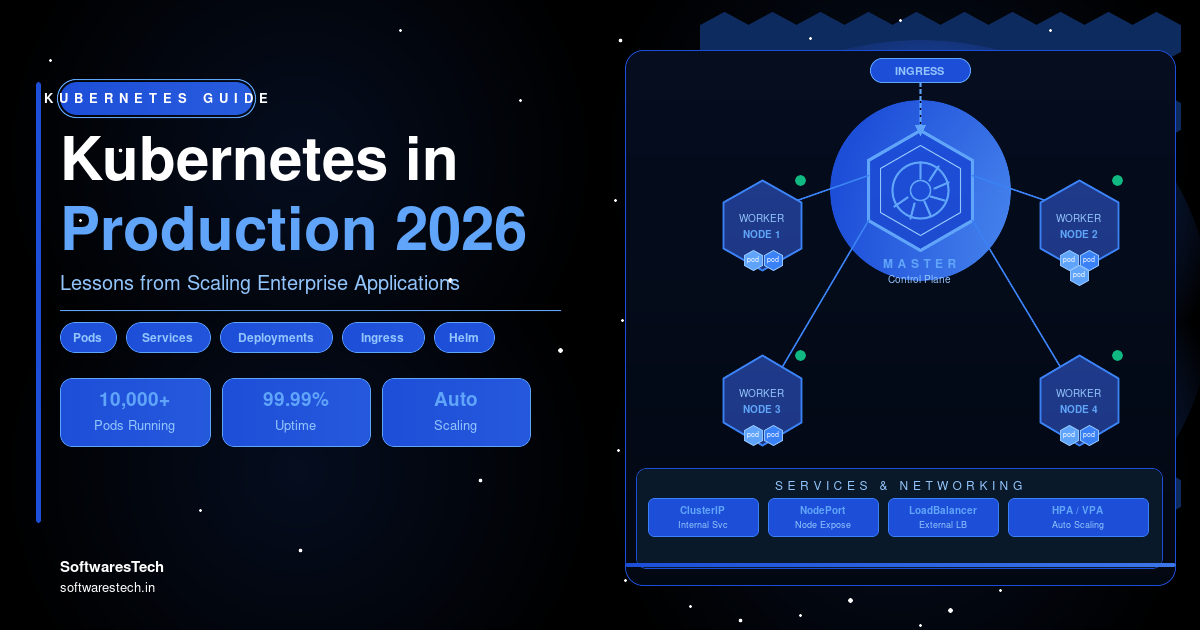
The first time you run kubectl get pods against a production cluster that’s serving real customer traffic, something shifts. The conference talks, the “getting started” tutorials, the architecture diagrams with clean arrows between neatly labeled boxes — none of that quite prepares you for a 3 a.m. page about a CrashLoopBackOff on a node that’s also somehow running out of inodes. Kubernetes in production is a different discipline than Kubernetes in a demo, and the gap between the two is where most of the real engineering happens.
This article is a collection of lessons from scaling Kubernetes for enterprise applications — systems handling meaningful production traffic, with real SLAs, real compliance requirements, and real on-call rotations. Some of these lessons came from things going right. A lot of them came from things going wrong at 2 a.m. and getting fixed before the next incident. If you’re a CTO evaluating whether Kubernetes is the right call, a DevOps engineer inheriting a cluster someone else built, or a cloud architect planning a migration, the goal here is to save you from learning some of these the hard way.
Why Enterprises Are Moving to Kubernetes
By the time an enterprise seriously evaluates Kubernetes, it’s usually not because of a trend — it’s because the existing setup has started to creak. A common pattern: a company has grown from a handful of services running on EC2 instances or a basic PaaS to thirty, fifty, or a hundred services, each with its own deployment process, its own scaling rules, and its own quirks that only one or two engineers fully understand. Container orchestration stops being optional once the operational overhead of “remembering how each service is deployed” exceeds the cost of standardizing on a platform that handles it for you.
Kubernetes wins this evaluation for a few concrete reasons. It gives you a single declarative API for describing how an application should run — how many replicas, how much CPU and memory, what it depends on, how it should be exposed — regardless of which team built it or which language it’s written in. It separates “where does this run” from “how do I deploy it,” which matters enormously when you’re running across multiple AWS accounts, multiple regions, or a mix of cloud and on-prem GPU capacity. And it has, for better or worse, become the lingua franca of infrastructure: every major observability vendor, every CI/CD tool, and most internal platform teams build against the Kubernetes API first.
The honest caveat, and one we give every client before they commit: Kubernetes does not reduce operational complexity. It relocates it. A team running ten services on EC2 with hand-rolled deploy scripts has real, painful complexity — but it’s complexity they’ve already paid for and (mostly) understand. Kubernetes trades that for a different kind of complexity: cluster lifecycle management, networking layers, RBAC, admission controllers, and a much larger surface area of things that can misconfigure. The enterprises that get the most value from Kubernetes are the ones that go in clear-eyed about this trade, not the ones expecting it to make infrastructure “simple.”
Production Architecture Overview
Before getting into the lessons, it’s worth describing what a reasonably mature enterprise Kubernetes setup actually looks like in practice, because a lot of the lessons below only make sense in this context. Most of the production environments we’ve worked on converge on a similar shape, even when the underlying business is completely different.
At the base, there’s a managed control plane — almost always EKS, GKE, or AKS at this point, because running your own control plane is a tax very few organizations should choose to pay. Above that, node groups are split by workload type: a general-purpose node group for stateless services, a separate group for memory-heavy workloads, and increasingly a spot-instance-backed group for fault-tolerant batch jobs and CI runners. Networking runs through a CNI plugin (Cilium and the AWS VPC CNI are the two we see most), with an ingress controller — commonly NGINX or AWS Load Balancer Controller — handling external traffic, and increasingly a service mesh (Istio or Linkerd) for internal service-to-service traffic once the number of services crosses roughly twenty to thirty.
On top of that sits the platform layer: a GitOps controller (ArgoCD is the most common we deploy) reconciling cluster state from Git, an admission controller (Kyverno or OPA Gatekeeper) enforcing baseline policies, cluster-autoscaler or Karpenter handling node provisioning, and an observability stack built around Prometheus, Grafana, and a log aggregation system like Loki or OpenSearch. Every one of the ten lessons below maps to a specific layer of this picture — and almost every painful incident we’ve debugged traces back to one of these layers being skipped, rushed, or “we’ll fix it after launch.”
Lesson #1: Start Small and Scale Gradually
The single most common mistake we see in enterprise Kubernetes adoption is trying to migrate everything at once. A platform team gets budget approval, stands up a shiny new EKS cluster with all the bells and whistles — service mesh, multiple admission controllers, a custom operator or two — and then tries to move forty services onto it in a single quarter. This almost never goes well, and when it goes badly, it goes badly in a way that makes the whole organization skeptical of Kubernetes for years.
The migrations that actually succeed start with one or two services — ideally ones that are important enough to matter, but not so critical that a mistake takes down the business. A good first candidate is an internal API or a non-customer-facing batch job: something with real traffic patterns and real dependencies, but with enough slack that the team can learn the platform’s failure modes without a Sev1 attached to every mistake.
We worked with one enterprise that picked their highest-traffic customer-facing checkout service as the first Kubernetes migration, because “if we can prove it works on the hardest service, the rest will be easy.” It was the opposite: the team spent six weeks debugging connection pool exhaustion, readiness probe misconfigurations, and DNS resolution issues under load — all while that service was their revenue-critical path. By the time they got it stable, leadership had lost confidence in the timeline, and the next eight services took twice as long because the team was gun-shy about every change. Compare that to a team that started with an internal reporting service: they hit the same class of issues, but with no customer impact, fixed their base Helm chart and node sizing once, and the next fifteen services migrated in weeks because the hard problems were already solved.
Lesson #2: Standardize Kubernetes Clusters
Once more than one team is deploying to Kubernetes, the question stops being “does this work” and becomes “does this work the same way everywhere.” Cluster standardization is the difference between a platform that scales linearly with the number of services and one where every new service adds disproportionate operational load.
In practice, standardization means a shared base for every workload: a common Helm chart (or Kustomize base) that handles the boilerplate — Deployment, Service, HorizontalPodAutoscaler, PodDisruptionBudget, common labels and annotations — with teams supplying only the values specific to their service. It means consistent namespace conventions (one namespace per team per environment is the pattern that scales best), consistent resource request/limit defaults so one team’s misconfigured pod doesn’t starve a neighbor, and Pod Security Standards enforced at the namespace level rather than left to individual manifest authors.
# charts/service-base/values.yaml — the shared starting point every team inherits
replicaCount: 3

resources:
  requests:
    cpu: 250m
    memory: 256Mi
  limits:
    cpu: "1"
    memory: 512Mi

podDisruptionBudget:
  minAvailable: 2

autoscaling:
  enabled: true
  minReplicas: 3
  maxReplicas: 20
  targetCPUUtilizationPercentage: 65

securityContext:
  runAsNonRoot: true
  readOnlyRootFilesystem: true
The mistake that’s costly to fix later is letting every team build their own chart “to move fast.” Eighteen months in, you end up with thirty charts that are 90% identical and 10% subtly different — different probe paths, different label schemes, different ways of mounting secrets — and a platform-wide change, like rolling out a new sidecar for mTLS or switching log formats, becomes a thirty-repository project instead of a one-line change to a shared chart version. A small platform team investing early in a golden-path chart that 80% of services can adopt unmodified is one of the highest-leverage things you can do before scaling past a handful of teams.
Lesson #3: Resource Management and Autoscaling
Resource requests and limits are the setting that everyone configures on day one and almost nobody revisits — and they’re also one of the most common sources of production incidents at scale. Set requests too low, and the scheduler over-packs nodes, leading to CPU throttling and memory pressure that manifests as mysterious latency spikes. Set them too high, and you’re paying for capacity that sits idle, often by a wide margin.
The autoscaling story has three layers that need to work together: the Horizontal Pod Autoscaler (HPA) scales the number of pod replicas based on CPU, memory, or custom metrics; the Vertical Pod Autoscaler (VPA), used carefully, can recommend or adjust resource requests based on actual usage; and a node autoscaler — Cluster Autoscaler or, increasingly, Karpenter — provisions and deprovisions nodes to match the pods that need scheduling. When these three are tuned independently without considering how they interact, you get scaling behavior that looks chaotic: pods scale up, but there’s no node capacity, so they sit Pending for minutes during a traffic spike — exactly when you need them most.
apiVersion: autoscaling/v2
kind: HorizontalPodAutoscaler
metadata:
  name: checkout-api
spec:
  scaleTargetRef:
    apiVersion: apps/v1
    kind: Deployment
    name: checkout-api
  minReplicas: 4
  maxReplicas: 40
  behavior:
    scaleUp:
      stabilizationWindowSeconds: 30
      policies:
        - type: Percent
          value: 100
          periodSeconds: 60
    scaleDown:
      stabilizationWindowSeconds: 300
  metrics:
    - type: Resource
      resource:
        name: cpu
        target:
          type: Utilization
          averageUtilization: 65
One enterprise client had a recurring incident every Monday morning: their checkout service would scale up correctly under the Monday traffic surge, but new pods sat Pending for four to six minutes because Cluster Autoscaler took that long to provision new nodes — and by the time capacity arrived, the HPA had already triggered alerts and the on-call team had been paged. The fix wasn’t a bigger cluster; it was switching to Karpenter with a small pool of pre-warmed nodes sized for exactly this pattern, and tuning the HPA’s scale-up behavior to be more aggressive earlier in the curve. The lesson generalizes: autoscaling isn’t one setting, it’s a pipeline, and the pipeline is only as fast as its slowest stage — which is almost always node provisioning, not pod scheduling.
Lesson #4: Secrets Management
Every Kubernetes cluster we’ve inherited from another team has, at some point, had a secret committed in plaintext — either directly in a manifest, in a ConfigMap that should have been a Secret, or in a Helm values file that made it into a public or semi-public repository. This isn’t a competence problem; it’s what happens when secrets management is treated as a one-time setup task instead of an enforced default.
The pattern that holds up is to never let raw secret values exist in Git at all. Instead, secrets live in a dedicated store — AWS Secrets Manager, HashiCorp Vault, or GCP Secret Manager — and a controller running in the cluster syncs them into native Kubernetes Secrets on a schedule. The External Secrets Operator has become the de facto standard for this, because it works the same way regardless of which backend you use, and it means a secret rotation in the backend automatically propagates to the cluster without anyone touching a manifest.
apiVersion: external-secrets.io/v1beta1
kind: ExternalSecret
metadata:
  name: payments-db-credentials
  namespace: payments-prod
spec:
  refreshInterval: 15m
  secretStoreRef:
    name: aws-secrets-manager
    kind: ClusterSecretStore
  target:
    name: payments-db-credentials
  data:
    - secretKey: username
      remoteRef:
        key: prod/payments/db
        property: username
    - secretKey: password
      remoteRef:
        key: prod/payments/db
        property: password
The recurring failure mode isn’t the initial setup — it’s the second service. A team sets up External Secrets Operator correctly for their first service, feels confident the problem is solved, and then six months later a different team ships a new microservice with a database password hardcoded in a ConfigMap because “it was faster for the demo, we’ll fix it before launch.” It ships to production anyway. The only durable fix is making the secure path the default path: a base chart that only supports ExternalSecret references, with no field for plaintext values, so the insecure option simply doesn’t exist in the template a new service starts from.
Lesson #5: Monitoring with Prometheus and Grafana
Kubernetes monitoring has a deceptive on-ramp. Install kube-prometheus-stack via Helm, and within twenty minutes you have dozens of dashboards showing cluster CPU, memory, pod counts, and node health. It looks like observability is solved. It isn’t — what you have is infrastructure metrics, and infrastructure metrics answer “is the cluster healthy” but not “is the application working for users,” which are very different questions that diverge exactly when you need the answer most.
The monitoring setups that actually help during incidents are built around application-level Service Level Objectives (SLOs): request latency percentiles, error rates, and saturation, scraped via ServiceMonitors and alerted on via PrometheusRules that reflect error budgets rather than raw thresholds. Grafana dashboards are then organized by service and by user journey — “can a customer complete checkout” — not just by cluster resource.
apiVersion: monitoring.coreos.com/v1
kind: PrometheusRule
metadata:
  name: checkout-api-slo
  namespace: payments-prod
spec:
  groups:
    - name: checkout-api.rules
      rules:
        - alert: CheckoutAPIErrorBudgetBurn
          expr: |
            sum(rate(http_requests_total{job="checkout-api", code=~"5.."}[5m]))
            /
            sum(rate(http_requests_total{job="checkout-api"}[5m]))
            > 0.02
          for: 10m
          labels:
            severity: page
          annotations:
            summary: "Checkout API error rate above 2% SLO budget"
The most expensive monitoring mistake at scale is dashboard sprawl with no alerting discipline. One client had over two hundred Grafana dashboards after a year of Kubernetes adoption — one per service, created from a copy-pasted template, most never opened outside of an incident, and almost none with alerts attached. When a real incident hit, the on-call engineer didn’t know which of two hundred dashboards to open first. We spent more time consolidating and deleting dashboards than building new ones — down to about thirty curated views organized by user journey, each with SLO-based alerts wired to the on-call rotation. Mean time to detection for the next major incident dropped from around forty minutes to under five.
Lesson #6: Logging Strategy
In a Kubernetes environment, pods are ephemeral by design — they get rescheduled, evicted, and replaced constantly, often multiple times an hour on a busy autoscaling cluster. Any log written to a container’s local filesystem disappears the moment that pod is gone. Centralized logging isn’t an enhancement; it’s the only way an incident responder can reconstruct what happened across dozens of containers that may not even exist anymore by the time someone looks.
The practice that makes centralized logging genuinely useful, rather than just a searchable pile of text, is structured logging with consistent fields: every log line as JSON, with a trace ID that ties it to a distributed trace, plus consistent service name, namespace, and version fields. A DaemonSet running Fluent Bit or Vector ships logs to Loki or OpenSearch, tagged automatically with Kubernetes metadata (namespace, pod, container, node) so engineers can filter by any of those dimensions without each application needing to know about them.
# fluent-bit filter — enrich every log line with Kubernetes metadata automatically
[FILTER]
    Name                kubernetes
    Match               kube.*
    Kube_URL            https://kubernetes.default.svc:443
    Merge_Log           On
    Keep_Log            Off
    K8S-Logging.Parser  On
    K8S-Logging.Exclude On
The mistake that turns logging from an asset into a liability is the absence of a retention and sampling strategy. One enterprise client’s logging bill grew to exceed their compute bill within a year — partly from debug-level logging left on in production, partly from health-check requests generating thousands of identical log lines per minute per service. The fix was tiered: seven days of hot, fully-indexed storage for everything, ninety days of cold storage for compliance, and sampling applied to known high-volume, low-value lines like health checks — cutting the logging bill by roughly 60% without losing anything an engineer actually searched for during an incident in the prior six months.
Lesson #7: Kubernetes Security Hardening
Kubernetes security hardening covers a wide surface, but in practice, three layers catch the overwhelming majority of real-world issues: Role-Based Access Control (RBAC), network policies, and pod security standards. Each one, on its own, is straightforward. The hardening work is making sure all three are enforced by default for every new namespace and workload, not opt-in.
RBAC misconfiguration is the most common finding in security reviews we run — almost always in the direction of over-permissioning. A service account created for “a quick debugging task” gets cluster-admin because it was faster, and eighteen months later it’s still cluster-admin, used by a production workload nobody remembers granting that access to. Network policies, by default, allow all pod-to-pod traffic within a cluster — meaning a compromised low-risk service (say, an internal admin tool) can reach a payments database directly unless policies explicitly deny it.
apiVersion: networking.k8s.io/v1
kind: NetworkPolicy
metadata:
  name: default-deny-ingress
  namespace: payments-prod
spec:
  podSelector: {}
  policyTypes:
    - Ingress
---
apiVersion: rbac.authorization.k8s.io/v1
kind: Role
metadata:
  namespace: payments-prod
  name: deploy-viewer
rules:
  - apiGroups: ["apps"]
    resources: ["deployments", "replicasets"]
    verbs: ["get", "list", "watch"]
The mistake worth calling out specifically: treating security hardening as a pre-launch checklist item rather than an enforced baseline. A team passes a security review before going live with a default-deny network policy and tightly scoped RBAC roles — and then six months later, a new service is added to the same namespace without anyone re-checking whether the existing policies cover it correctly. Admission controllers like Kyverno or OPA Gatekeeper close this gap by rejecting non-compliant manifests at apply time, regardless of who’s deploying or when — turning “we checked this once” into “this is structurally impossible to violate.”
Lesson #8: Multi-Environment Deployments
Running Kubernetes across multiple environments — dev, staging, and production, often multiplied across regions — introduces a question that’s easy to underestimate: how do you keep environments close enough to be useful for testing, while keeping production properly isolated and protected?
The pattern that scales is Kustomize overlays (or Helm value files) layered on a shared base: the base manifest defines what a service is, and each environment’s overlay defines only the differences — replica counts, resource sizing, environment-specific config, and which image tag to deploy. GitOps then manages each environment from its own path or branch, with production requiring an explicit promotion step — typically a pull request bumping an image tag — rather than being auto-deployed from every merge to main.
# overlays/production/kustomization.yaml
resources:
  - ../../base

patches:
  - path: replica-count.yaml
  - path: resource-limits.yaml

images:
  - name: checkout-api
    newTag: v2.14.3

namespace: payments-prod
The failure mode we see most often here is “staging drift” — staging starts as a faithful smaller copy of production, but over months, ad hoc changes accumulate in production that never get backported to the overlay structure, or staging gets used as a dumping ground for experiments that change its shape. Eventually, “tested in staging” stops meaning anything, because staging no longer resembles production closely enough to catch real issues. The fix is treating the overlay structure itself as the documentation of environment differences — if a difference between staging and production isn’t expressed as an explicit overlay patch, it shouldn’t exist.
Lesson #9: Disaster Recovery Planning
Disaster recovery for Kubernetes has two distinct layers that get conflated far too often: recovering the cluster itself (control plane, node groups, cluster-level config) and recovering what’s running on it (application state, persistent volumes, databases). Most teams plan for the first and assume the second is “just Kubernetes objects, we can redeploy from Git” — which is true for stateless workloads and dangerously incomplete for anything with persistent state.
Velero has become the standard tool for backing up both Kubernetes object state and the persistent volumes attached to it, on a schedule, to object storage in a separate region or account. For databases running inside or alongside the cluster, point-in-time recovery needs to be configured and tested independently — a Velero backup of an RDS-backed application doesn’t include the database itself.
apiVersion: velero.io/v1
kind: Schedule
metadata:
  name: payments-prod-daily
spec:
  schedule: "0 3 * * *"
  template:
    includedNamespaces:
      - payments-prod
    snapshotVolumes: true
    ttl: 720h0m0s
The lesson that’s painful to learn during a real incident: a backup that has never been restored is a hypothesis, not a backup. We worked with a client whose Velero backups had been “running successfully” according to their dashboard for over four months — until a node group failure during an AZ outage required an actual restore, and it failed, because a service account permission used by the backup job had been narrowed during an unrelated security hardening pass, and backups had been silently writing empty archives ever since. The fix going forward was a scheduled, automated restore-into-a-scratch-namespace test, run weekly, that fails loudly if a restore doesn’t produce the expected resources — turning “we assume backups work” into “we know backups work, because we tested one six days ago.”
Lesson #10: Cost Optimization at Scale
Cost optimization in Kubernetes tends to follow a predictable arc: in the first six months, nobody looks at cost because getting things working is the priority. Then a finance review surfaces a cloud bill that’s grown faster than the business, and suddenly cost optimization becomes urgent — usually framed as “why is Kubernetes so expensive,” when the actual issue is almost always over-provisioning that accumulated quietly.
The biggest, fastest wins are usually in three places: switching fault-tolerant workloads (CI runners, batch jobs, queue workers) to spot instances via Karpenter, which can cut compute costs for those workloads by 60-70%; rightsizing resource requests based on actual usage data rather than initial guesses, which on most clusters we’ve audited recovers 20-40% of allocated-but-unused capacity; and enforcing per-team or per-namespace cost visibility, so the team making a request can see its cost impact directly, rather than the bill landing on a central infrastructure budget six weeks later with no clear owner.
apiVersion: karpenter.sh/v1
kind: NodePool
metadata:
  name: spot-batch
spec:
  template:
    spec:
      requirements:
        - key: karpenter.sh/capacity-type
          operator: In
          values: ["spot"]
        - key: kubernetes.io/arch
          operator: In
          values: ["amd64"]
      taints:
        - key: workload-type
          value: batch
          effect: NoSchedule
  limits:
    cpu: "1000"
One enterprise client reduced their EKS compute spend by roughly 35% over two quarters without any customer-facing changes, purely from three actions: moving CI runners and background workers to Karpenter-managed spot nodes, rightsizing four over-provisioned node groups based on six weeks of real utilization data, and adding a weekly automated report flagging any namespace where requested resources exceeded actual usage by more than 50%. None of this required new tooling beyond what was already running — it required someone to actually look at the data and act on it, on a recurring schedule rather than as a one-time audit.
Real Enterprise Migration Case Study
To tie these lessons together, here’s how they played out across an eighteen-month migration at a mid-sized logistics and fulfillment company — a composite drawn from patterns across several real engagements, representative of what this actually looks like in practice.
The company started with around forty services running on a mix of EC2 instances and a managed PaaS, each deployed through a different process depending on which team and which era it was built in. The catalyst for change was operational: a warehouse management system outage during a peak season took nearly six hours to resolve, partly because the on-call engineer didn’t know which of three deployment methods had been used for the affected service, and partly because there was no centralized way to see what version was actually running in production versus what was supposed to be running.
Following Lesson #1, the migration started with two internal services — an inventory sync job and an internal reporting API — deployed to a new EKS cluster over six weeks. This is where the base Helm chart, namespace conventions, and CI/CD pipeline templates were built and refined, with no customer-facing risk. By the time the third and fourth services migrated, the platform team had already hit and fixed issues with readiness probes, DNS caching under load, and resource limit defaults — problems that would have been much higher-stakes on a customer-facing service.
Over the following twelve months, the remaining services migrated in waves of four to six, grouped by team rather than by technical similarity, so each team could dedicate focused time without context-switching across the whole organization at once. ArgoCD was introduced at wave three, once enough services existed to make GitOps worth the setup cost; External Secrets Operator and the default-deny network policy baseline were rolled out as a platform-wide change applied retroactively to already-migrated services, not just new ones.
By the end of the migration, the warehouse management system — the service that triggered the whole project — ran across two regions with automated failover, had restore-tested backups, and was monitored against SLOs with alerts tuned over several iterations to eliminate noise. The next peak-season incident of similar severity was detected in under three minutes and resolved in under twenty, with the on-call engineer working from a single dashboard showing exactly what version was running, where, and what had changed in the prior hour. The infrastructure didn’t get simpler — but the complexity became visible, consistent, and debuggable, which is the actual goal.
Common Kubernetes Mistakes
Across these lessons and many engagements, a small set of mistakes account for a disproportionate share of production incidents:
- Migrating the most critical service first “to prove it works,” instead of building platform muscle on lower-risk workloads.
- Letting every team build its own Helm chart, leading to dozens of near-identical charts that make platform-wide changes painfully slow.
- Setting resource requests once and never revisiting them, leading to either throttling under load or significant wasted spend.
- Treating secrets management as a one-time setup rather than the only available path for every new service.
- Building dozens of dashboards with no SLO-based alerts, so incidents are detected by customers before they’re detected by monitoring.
- Logging without structure, sampling, or retention tiers, until the logging bill rivals the compute bill.
- Treating RBAC and network policy as a launch checklist item rather than an enforced, continuously-checked baseline.
- Letting staging environments drift until “tested in staging” no longer predicts production behavior.
- Never restore-testing backups, discovering they’re broken only during a real disaster.
- Treating cost optimization as a quarterly fire drill instead of an ongoing, automated feedback loop.
Tools We Use in Production
The tooling that supports these lessons is mostly unglamorous and widely available — the value comes from consistent application, not exotic choices. Here’s the core of what shows up across the production environments we run:


Future of Kubernetes
A few shifts are already changing what “production-ready Kubernetes” will mean over the next few years. Platform engineering continues to mature as the default operating model — rather than every team learning Kubernetes deeply, a platform team exposes a curated, self-service interface (often via tools like Backstage or Crossplane) so product teams request “a service with a database and a queue” without writing raw manifests.
Karpenter-style just-in-time node provisioning is becoming the default over traditional cluster autoscaling, particularly as workloads diversify across CPU architectures and instance types — including growing GPU and accelerator usage for AI workloads running alongside traditional services in the same clusters. eBPF-based tooling, particularly Cilium, is increasingly handling networking, security policy enforcement, and observability in a single layer, reducing the number of separate components a platform team needs to operate.
And policy-as-code is expanding well beyond security: the same admission-control mechanisms that enforce “containers can’t run as root” are increasingly used to enforce cost policies, data residency requirements, and resource quotas — turning organizational policy from documentation that’s hopefully followed into rules that are structurally enforced at the API level, regardless of who’s deploying.
Conclusion
None of these ten lessons are exotic. Cluster standardization, autoscaling tuned end-to-end, secrets that never touch Git, SLO-based monitoring, structured logging, enforced RBAC and network policy, environments that don’t drift, restore-tested backups, and an ongoing cost feedback loop — every one of these is well-documented and widely discussed. What separates the enterprises running Kubernetes in production smoothly from the ones fighting it constantly isn’t knowledge of these practices. It’s having gone through the process — often painfully — of applying them consistently, before an incident forces the issue.
If you’re early in this process, the most useful thing you can do is resist the urge to solve every layer at once. Pick the lesson where you already suspect you have the biggest gap — for most teams, it’s either monitoring that can’t distinguish “infrastructure is fine but users are affected” from “infrastructure is fine, full stop,” or backups that have never been restored — and fix that one thing thoroughly before adding the next layer of platform complexity.
Need Help Scaling Kubernetes in Production?
Designing a Kubernetes platform that holds up under real production traffic — not just a demo — is exactly the kind of work that benefits from having done it before, more than once, across different organizations. Softwarestech’s DevOps consulting services work with engineering teams to design enterprise Kubernetes architecture, build the shared platform layer (GitOps, autoscaling, secrets, security policy), and set up the monitoring and cost feedback loops that keep a cluster healthy long after launch day. If you’re planning a migration or trying to stabilize a cluster someone else built, we can help you map your current setup against the lessons in this guide and prioritize what to fix first.
FAQ
Is Kubernetes worth it for a mid-sized enterprise, or only for big tech companies?
Kubernetes earns its complexity once an organization is managing roughly fifteen to twenty or more services across multiple environments and needs consistent deployment, scaling, and security patterns across teams. Below that, the operational overhead of running Kubernetes often exceeds the problems it solves, and a simpler platform like ECS or a managed PaaS is usually the better fit.
How long does an enterprise Kubernetes migration typically take?
For an organization with thirty to fifty services, a realistic timeline is twelve to eighteen months, done in waves rather than all at once. The first one to two services typically take the longest, since that’s when the shared platform — base charts, CI/CD pipelines, monitoring, security baselines — gets built; later waves move faster because that foundation already exists.
What’s the most common cause of Kubernetes production incidents?
Resource misconfiguration — requests and limits set incorrectly, or autoscaling tuned for only part of the scaling pipeline (pods scale but nodes don’t provision fast enough, or vice versa). The second most common cause is configuration drift between environments, where something tested successfully in staging behaves differently in production because the two environments have quietly diverged.
How do you handle secrets management in Kubernetes without storing them in Git?
The standard pattern is the External Secrets Operator (or a cloud-native equivalent) syncing secrets from a dedicated store — AWS Secrets Manager, Vault, or GCP Secret Manager — into native Kubernetes Secrets on a schedule. Application manifests reference an ExternalSecret resource, never a raw value, so the secret’s actual value never needs to exist in a Git repository at any point.
What’s the difference between Cluster Autoscaler and Karpenter?
Cluster Autoscaler works by scaling existing node groups up or down based on pending pods, which means it’s constrained to the instance types and sizes defined in those node groups. Karpenter provisions nodes directly based on the actual requirements of pending pods, choosing instance types dynamically, which generally results in faster provisioning and better bin-packing, especially for diverse or spot-instance-heavy workloads.
How do you monitor Kubernetes clusters effectively without alert fatigue?
Build alerts around Service Level Objectives — error rate and latency budgets tied to what actually matters to users — rather than raw infrastructure thresholds like “CPU above 80%.” Keep the number of dashboards deliberately small and organized by user journey rather than one per service, and make sure every alert that pages someone has a documented response; alerts nobody acts on get muted, and then the next real one gets muted too.
What Kubernetes security practices matter most for compliance audits?
RBAC scoped to least privilege, network policies that default-deny and explicitly allow only required traffic, Pod Security Standards enforced at the namespace level, and admission controllers (Kyverno or OPA Gatekeeper) that reject non-compliant manifests automatically. Auditors generally want to see that these are structurally enforced, not just documented as policy.
How do you reduce Kubernetes costs without affecting performance?
The highest-impact, lowest-risk changes are moving fault-tolerant workloads (CI runners, batch jobs, async workers) to spot instances, and rightsizing resource requests based on actual usage data rather than initial estimates. Both can typically be done without any customer-facing change, and together often recover 30-40% of compute spend on clusters that haven’t been actively cost-managed.
Should every team manage their own Kubernetes namespace, or should a central platform team own it all?
A hybrid model works best at scale: a central platform team owns the cluster, the shared base chart, security policy, and observability tooling, while individual teams own their own namespaces and deploy their own services using that shared foundation. Fully centralized deployment becomes a bottleneck past a handful of teams; fully decentralized ownership leads to the standardization problems described in Lesson #2.
What should be in place before running a stateful workload in Kubernetes?
At minimum: persistent volume backups via a tool like Velero on a regular schedule, a tested restore procedure (not just a backup job that “succeeds”), point-in-time recovery configured for any database, and resource requests sized based on the workload’s actual I/O and memory profile rather than generic defaults. Many teams choose to run databases on managed services outside the cluster specifically to avoid taking on this operational burden directly.
Further Reading
- DevOps Best Practices: CI/CD & Monitoring
- DevOps Best Practices 2026
- Microservices Architecture Guide
For industry benchmarks and additional context, we recommend the Kubernetes Official Documentation.
Need Help Building Your Next Digital Product?
From web and mobile apps to cloud infrastructure and AI-powered platforms — our engineers can help you plan, build and scale with confidence.
Related Articles
Enterprise Cloud Optimization Services in 2026: The Complete Infrastructure Guide
As digital transformation accelerates across every industry, modern enterprises face a double-edged sword: cloud environments offer unparalleled agility, yet unmanaged cloud infrastructure quickly leads...


High-Performance Cloud Optimization in 2026: The Complete Enterprise Infrastructure Guide
As digital transformations accelerate across every industry, organizations face a double-edged sword: the cloud offers unparalleled agility, yet unmanaged cloud infrastructure quickly leads to...
DevOps Best Practices in 2026: From CI/CD to Production Monitoring
If you've spent any real time on call, you already know that "DevOps" stopped being a job title years ago and became a shared...
