

Written by the Softwarestech Software Engineering Team — reviewed by Senior solution architects. Last updated: June 2026.
We’ve run software development lifecycle reviews for clients ranging from three-person startups to 800-person enterprises, and the same pattern shows up every time: teams that treat the SDLC as a flexible operating system ship faster and break less than teams that treat it as a rulebook. This guide is built from what’s actually working on our active projects right now, not from a textbook diagram.
On This Page
- The Six SDLC Phases, Reimagined for 2026
- Agile, Scrum, Shape Up, and Hybrid Approaches
- AI-Assisted Coding: What Changes
- Monolith vs Microservices vs Modular Monolith
- Low-Code and No-Code: Where It Fits
- QA and Test Automation in 2026
- Security by Design: DevSecOps
- Comparing SDLC Methodologies
- Real-World Example: MVP in 10 Weeks
- Real-World Example: Cutting Bugs by Two-Thirds
- Putting It Together: Building Your 2026 SDLC
- Frequently Asked Questions

Key Takeaways
- The software development lifecycle in 2026 is faster but not shorter — the same six phases exist, but planning, testing, and security now happen continuously instead of in sequence.
- AI coding assistants compress the development phase by 20-40%, but they shift more time into code review, architecture decisions, and testing — not less.
- Modular monoliths are back in favor for teams under 30 engineers, offering most of the organizational benefits of microservices without the operational overhead.
- Shift-left testing and AI-assisted test generation are turning QA from a late-stage gate into a continuous activity baked into every commit.
- DevSecOps is no longer optional — security scanning, dependency checks, and threat modeling need to run inside the pipeline, not after it.
- Low-code platforms are excellent for internal tools and prototypes, but most products with real scaling or integration needs still require custom development.
- Methodology choice should follow team size and product stage, not trends — what works for a 5-person startup will actively slow down a 200-person enterprise team.
If you’re a CTO or product owner planning a build in 2026, the software development lifecycle 2026 you choose, and how you adapt it, will affect your timeline, your budget, and how much technical debt you’re carrying in eighteen months. The fundamentals of the SDLC haven’t changed much in twenty years. What has changed is how each phase gets executed, who (or what) does the work, and how much overlap there is between phases that used to be strictly sequential.
This guide walks through the modern SDLC phase by phase, compares the methodologies teams are actually using right now, and looks at where AI tools, architecture choices, and low-code platforms fit into the picture. We’ll also share two examples from recent client work that show how these pieces come together in practice — plus a checklist you can use to sanity-check your own setup before your next planning cycle.
The Six SDLC Phases, Reimagined for 2026
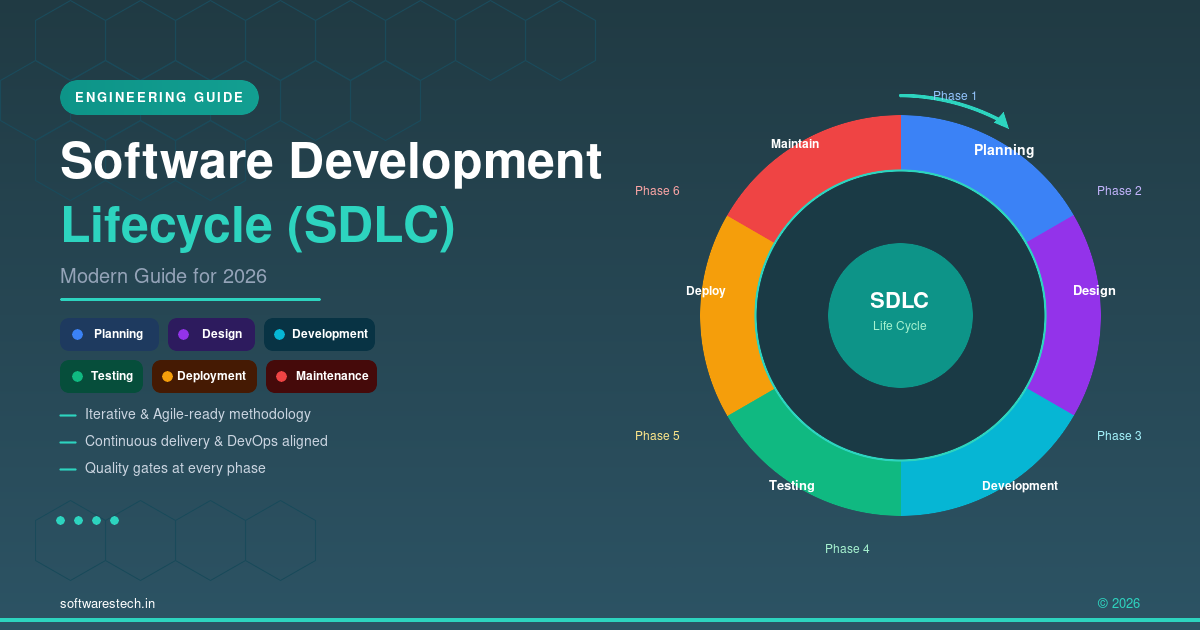
Every software development lifecycle still breaks down into planning, design/architecture, development, testing, deployment, and maintenance. What’s different in 2026 is that these phases increasingly run in parallel and loop back on each other constantly, supported by tooling that didn’t exist five years ago. Below is a quick look at how each phase has shifted — and a feature row of the core building blocks that show up across all six.
Code
Architecture
Testing
Deployment
Planning: From Quarterly Roadmaps to Living Backlogs
Planning used to mean a big upfront requirements document and a roadmap locked for a quarter. In 2026, most teams we work with maintain a living backlog that gets re-prioritized weekly based on user data, support tickets, and competitive pressure. AI-assisted research tools now help product managers synthesize customer interviews and analytics into requirements drafts in hours instead of days — but someone on the team still has to make the actual prioritization calls, because that’s a judgment call, not a data problem.
The practical shift: build in checkpoints every 1-2 weeks where priorities can change, rather than committing to a fixed scope for three months and discovering in week 10 that half of it is no longer relevant.
Architecture
Design and Architecture: Decisions That Are Harder to Undo
Architecture decisions made in week one of a project shape what’s possible (and expensive) for years afterward. We cover this in more depth below, but the core 2026 trend is that teams are deliberately choosing simpler architectures upfront and deferring complexity until it’s proven necessary, rather than designing for a scale they may never reach.
Code
Development: Where AI Tools Have Changed the Daily Workflow Most
This is the phase that’s changed the fastest. AI coding assistants like GitHub Copilot, Claude Code, and Cursor are now standard tooling on most engineering teams, not novelties. We’ll dig into exactly what this means below, but the short version is: routine code gets written faster, and engineers spend a larger share of their time on review, integration, and the kind of design thinking that AI tools still can’t do reliably.
Testing
Testing: Continuous, Not Final
Testing in 2026 isn’t a phase that happens after development — it’s woven through every commit via automated pipelines, AI-generated test cases, and shift-left practices that catch issues while code is still being written. More on this in the QA section below.
Deployment
Deployment: Multiple Times a Day, With Guardrails
For teams with mature CI/CD, deployment has become almost invisible — code merges to main, passes automated checks, and rolls out to production behind feature flags within the hour. The skill has shifted from “how do we deploy safely” to “how do we deploy safely often“, which requires investment in observability, automated rollback, and progressive delivery (canary releases, blue-green deployments). If your team is still doing big-bang releases every few weeks, it’s worth reading our guide to DevOps best practices for 2026, which covers CI/CD pipeline design in detail.
Maintenance: The Phase That Now Starts on Day One
Maintenance used to mean bug fixes after launch. Now it includes ongoing dependency updates (security patches land weekly for most stacks), monitoring and incident response, and the steady work of paying down technical debt before it compounds. Teams that budget 15-20% of engineering capacity for maintenance from the start tend to avoid the painful “stabilization quarter” that teams without that budget eventually have to take.
Pro Tip
When you re-prioritize your backlog weekly, keep a one-line “why this moved” note on anything that jumps the queue. Six weeks later, when someone asks why a feature got bumped twice, that note saves you a half-hour meeting and stops the same debate from happening again.

Agile, Scrum, Shape Up, and Hybrid Approaches: What Actually Works
There’s a lot of noise about methodology, and honestly, most of it doesn’t matter as much as people think. What matters more is whether your process matches your team size, your product’s maturity, and how predictable your work is.
Scrum — with its two-week sprints, daily standups, and sprint reviews — is still the most common framework, and for good reason: it gives teams a predictable rhythm and forces regular check-ins with stakeholders. But we’ve seen plenty of teams cargo-cult Scrum ceremonies without getting any of the benefits, turning standups into status-report theater and sprint planning into a guessing game.
Shape Up, the methodology popularized by Basecamp, has gained real traction with product teams in the 8-15 person range. Instead of sprints, work is “shaped” into well-defined problems with fixed appetites (typically 6-week cycles), and teams are given autonomy to solve them without daily check-ins. It works well when you have a small number of senior engineers who don’t need close oversight, but it can fall apart with junior-heavy teams who need more structure.
Trunk-based development — where everyone commits to a single main branch frequently, supported by feature flags rather than long-lived feature branches — has become the default for teams practicing continuous delivery. It pairs naturally with CI/CD and reduces the merge-conflict nightmares that come with GitFlow-style branching strategies on fast-moving teams. If you’re weighing how this fits with your broader technology choices, our guide to web development trends for 2026 covers how stack and architecture decisions interact with delivery cadence.
What we see most often in practice, especially with mid-sized clients, is a hybrid: two-week Scrum-like cycles for predictable feature work, combined with trunk-based development and feature flags for deployment, and Shape Up-style “fixed appetite” framing for larger initiatives that don’t fit neatly into a sprint. The label matters less than whether your team has a shared rhythm and a clear way to say “this is done” and “this is blocked.”
AI-Assisted Coding: What Copilots Change (and What They Don’t)
By mid-2026, AI coding assistants are embedded in most professional developer workflows — not as an experiment, but as a default part of the toolchain, similar to how IDEs with autocomplete became standard fifteen years ago. The honest assessment from our engineering leads: these tools are excellent at specific things and still limited at others.
What they’re genuinely good at: writing boilerplate, generating test scaffolding, translating code between languages, explaining unfamiliar codebases to new team members, and drafting first-pass implementations of well-specified functions. On a recent project, our team used Claude Code to scaffold an entire API client library from an OpenAPI spec in under an hour — work that would have taken a junior engineer most of a day.
What they’re still not good at: making architecture decisions, understanding the unwritten business context behind a requirement, debugging subtle concurrency issues, or knowing when “technically correct” code is going to cause problems for the team six months from now. AI-generated code also tends to be confidently wrong in ways that look plausible — a function that handles 95% of cases correctly but silently mishandles an edge case is arguably more dangerous than one that’s obviously broken, because it passes a casual review.
The practical implication for the SDLC: code review has become more important, not less, even as raw coding speed increases. Teams that have adopted AI assistants well tend to have explicit guidelines about what AI-generated code requires extra scrutiny (anything touching auth, payments, or data integrity, for example) and they’ve adjusted estimates to reflect that review time, not just generation time. Net-net, we typically see a 20-40% reduction in time spent on the development phase itself, but a chunk of that gets reinvested into review and testing — which, done right, is a good trade.
Architecture Decisions: Monolith vs Microservices vs Modular Monolith
This is one of the highest-stakes early decisions in any project, and it’s also where we see the most dogma. Microservices became the “correct” answer for a stretch of years regardless of team size or product maturity, and a lot of teams paid for that in operational complexity they weren’t ready for.
When a Monolith Is the Right Call
For most new products, a well-structured monolith is still the fastest path to market. One codebase, one deployment pipeline, one database (at least to start) — it’s simpler to develop, test, and operate when your team is small and your domain boundaries aren’t fully understood yet. The risk with monoliths is the “big ball of mud” problem, where everything becomes tangled together over time.
The Modular Monolith: A Practical Middle Ground
This is where we’ve seen the most momentum in 2026. A modular monolith keeps the single-deployment simplicity of a monolith but enforces strict internal boundaries between modules — separate packages or namespaces with well-defined interfaces, often with their own database schemas even if they share a physical database. This gives you most of the organizational clarity of microservices (teams can own modules independently, boundaries are explicit) without the operational tax of running, monitoring, and version-coordinating a dozen separate services.
The other advantage: if a specific module genuinely needs to scale independently later (say, a reporting engine that’s hammering the database while the rest of the app is fine), it’s a much smaller lift to extract a well-bounded module into its own service than to untangle a monolith that was never modular in the first place.
When Microservices Earn Their Complexity
Microservices make sense when you have genuinely independent scaling needs, multiple teams that need to deploy on their own schedules without coordinating, or regulatory/compliance reasons to isolate certain data and services. They also make sense for large enterprises with existing platform teams who can absorb the operational overhead — Kubernetes, service meshes, distributed tracing, and the on-call burden that comes with all of it. If you’re an enterprise navigating this kind of large-scale architecture decision, our guide to enterprise software solutions and digital transformation goes deeper into how this plays out at scale.
The honest guidance: start with a modular monolith unless you have a specific, concrete reason not to. “We might need to scale this part someday” is not a concrete reason. “Our compliance team requires this data to be physically isolated” is.
Common Pitfall
Choosing microservices on day one because “that’s how scalable companies do it” is one of the most expensive mistakes we see in early-stage projects. You end up paying for distributed-systems overhead — service discovery, network latency, cross-service transactions, a dozen deployment pipelines — before you have enough traffic or team headcount to justify any of it. Start with a modular monolith and split out services when a specific module proves it needs to scale independently, not before.

Low-Code and No-Code: Where It Fits (and Where It Doesn’t)
Low-code platforms like Microsoft Power Platform, Retool, and Bubble have matured significantly, and for the right use cases, they’re genuinely the smarter choice. Internal tools — admin dashboards, approval workflows, simple data entry apps — can often be built in days instead of weeks, and business users can maintain simple versions themselves after handoff.
Where low-code starts to break down is anywhere you need: complex custom business logic that doesn’t fit the platform’s model, tight integration with multiple external systems and APIs, performance at meaningful scale, or a user experience that needs to be genuinely differentiated (a customer-facing product where UX is part of your competitive advantage). We’ve also seen low-code projects that started cheap become expensive later, when the platform’s licensing costs scale with usage in ways that weren’t obvious at the start, or when the team hits a wall that requires custom development anyway — at which point you’re paying for both the low-code build and the rebuild.
Our rule of thumb: if the tool is internal-facing, has a limited user base, and the requirements are stable, low-code is worth seriously considering. If it’s customer-facing, core to your product, or likely to need significant custom logic within a year, custom development is usually the better long-term investment — even though the upfront cost is higher. This is especially true for cross-platform products; if you’re scoping a customer-facing mobile build, our mobile app development guide for 2026 walks through how this trade-off plays out for native versus cross-platform development.
QA and Test Automation in 2026: Shift-Left and AI-Assisted Testing
“Shift-left testing” means moving testing activities earlier in the development process — ideally to the point where a developer gets feedback about a bug within minutes of writing the code, not weeks later during a QA cycle. This isn’t a new idea, but the tooling to do it well has gotten dramatically better.
AI-assisted test generation tools can now analyze a function or a pull request and generate a reasonable set of unit tests, including edge cases a developer might not think to write themselves. They’re not a replacement for thinking about test strategy, but they’re excellent at filling in coverage gaps and catching the “what if this input is null/empty/negative” cases that often get skipped under deadline pressure.
The other major shift is in test automation maturity: visual regression testing, API contract testing, and synthetic monitoring in production are now standard parts of a mature pipeline, not nice-to-haves. Combined with feature flags, this lets teams catch issues in minutes rather than discovering them from a customer complaint days later.
A few practices we recommend to every client:
- Run unit and integration tests on every pull request, with merges blocked if they fail.
- Use AI-assisted test generation as a first pass, then have a human review and add tests for business-critical edge cases the AI wouldn’t know about.
- Maintain a small, fast suite of end-to-end tests for critical user journeys (checkout, login, core workflows) — not hundreds of brittle E2E tests that take an hour to run.
- Track flaky tests as a priority, not as background noise — a test suite people don’t trust is a test suite people start ignoring.
Security by Design: DevSecOps Throughout the Lifecycle
Bolting security on at the end of a project, right before launch, has never worked well, and in 2026 it’s close to indefensible given how cheap it’s become to integrate security checks earlier. DevSecOps means security activities are distributed across the whole lifecycle rather than concentrated in a pre-launch audit.
In practice, this looks like: automated dependency scanning that flags vulnerable packages on every build (tools like Dependabot, Snyk, or Trivy running in CI), static application security testing (SAST) that checks code for common vulnerability patterns before it merges, secrets scanning to catch API keys accidentally committed to repos, and infrastructure-as-code scanning to catch misconfigured cloud resources before they’re deployed. Many of these scanners map directly to categories in the OWASP Top Ten, which is still the most useful baseline for prioritizing what to fix first.
Threat modeling — sitting down during the design phase and asking “how could this be abused, and what’s the blast radius if it is” — is also creeping earlier into projects, especially for anything handling personal data, payments, or authentication. It’s a half-day exercise that regularly surfaces design changes that would have been far more expensive to make after launch. For a broader view of what businesses need to have in place, our cybersecurity essentials guide for 2026 covers the organizational side of this alongside the technical practices.
The bottom line: security checks that run automatically and continuously catch the majority of common issues cheaply. Security reviews that happen once, right before launch, catch the same issues, but expensively — and sometimes too late to fix without delaying the release.
Comparing SDLC Methodologies: A Practical Reference
There’s no single “best” methodology — the right choice depends heavily on team size, how well-understood the requirements are, and how predictable the work is. Here’s how the major approaches stack up in practice. Teams operating under formal quality frameworks may also want to check how their chosen methodology maps to standards such as ISO/IEC 12207 for software lifecycle processes, particularly if you sell into regulated industries.
| Methodology | Best For | Team Size | Typical Cycle | Watch Out For |
|---|---|---|---|---|
| Waterfall | Highly regulated projects with fixed, well-understood requirements (e.g., compliance-driven government systems) | Any, but common in large org structures | Months to years, sequential phases | Late discovery of requirement gaps; expensive to change direction mid-project |
| Agile / Scrum | Product teams with evolving requirements and regular stakeholder feedback | 5-12 per team | 1-2 week sprints | Ceremony without substance; sprint goals that change mid-sprint |
| Shape Up | Senior, autonomous teams tackling well-defined problems without close oversight | 8-15 per team | 6-week cycles + 2-week cooldown | Needs strong individual ownership; less suited to junior-heavy teams |
| Trunk-Based + Hybrid | Teams practicing continuous delivery who need both predictability and deployment speed | 5-50+ per team | Continuous, with 1-2 week planning cycles | Requires solid CI/CD and feature-flag discipline to avoid breaking main |
Real-World Example: An MVP in 10 Weeks With a Modular Monolith
A health-tech startup came to us with a fairly common problem: they had funding for roughly three months of development, a long wish list of features, and a hard deadline tied to a pilot agreement with their first healthcare provider client. They’d previously been advised by another vendor to build on microservices “for scalability.”
We restructured the plan around a modular monolith, built in a single repository with clearly separated modules for patient intake, scheduling, provider messaging, and billing — each with its own internal API boundary, even though they shared one deployment and one database to start. Development used a hybrid approach: two-week planning cycles to track progress against the pilot deadline, trunk-based development with feature flags so incomplete features could merge without blocking releases, and AI-assisted coding (Claude Code and Copilot) for scaffolding the CRUD layers and test suites for each module.
The result: a working MVP covering the core patient and provider workflows shipped in 10 weeks, on budget. Six months later, when the scheduling module needed to handle a 5x increase in load after they signed two more healthcare providers, the modular boundaries meant the team could extract just that module into its own service in about three weeks — a fraction of what it would have taken to retrofit boundaries into an unstructured codebase, and a much smaller effort than the microservices-from-day-one approach would have required across the whole system.
Real-World Example: Cutting Production Bugs by Two-Thirds With Shift-Left Testing
An enterprise client in the logistics space came to us with a familiar pain point: their release cycle had stretched from two weeks to nearly six, mostly because of a QA bottleneck. Every release went through a manual QA cycle that took 1-2 weeks, regularly found issues that required code changes, and then had to be re-tested — sometimes more than once.
We worked with their engineering team to shift testing left across the pipeline. Every pull request now runs an automated suite (unit, integration, and a curated set of end-to-end tests covering their core shipment-tracking workflows) before it can merge. We introduced AI-assisted test generation to backfill coverage on legacy modules that had little to no existing tests — this alone added roughly 1,200 test cases across the codebase over two months, most of which needed only minor human review. Static analysis and dependency scanning were added to the CI pipeline to catch security and code-quality issues automatically.
Within one quarter, production-reported bugs dropped by roughly two-thirds, and the release cycle returned to two weeks — but more importantly, releases became predictable again, which let the product team commit to dates with their own customers with much more confidence. The manual QA team didn’t go away; their role shifted from “find every bug before release” (an impossible job at scale) to exploratory testing and UX review, which is where human judgment actually adds the most value.
Quick Checklist: Is Your SDLC Ready for 2026?
- ✓Your backlog gets re-prioritized at least every two weeks based on real data, not just opinions in a meeting.
- ✓You can name the specific, concrete reason your architecture is a monolith, modular monolith, or microservices — not just “best practice.”
- ✓You have written guidelines for which AI-generated code requires extra review (auth, payments, data integrity).
- ✓Every pull request runs automated unit and integration tests, and merges are blocked on failure.
- ✓Dependency scanning, SAST, and secrets scanning run automatically in CI, not as a manual pre-launch step.
- ✓You’ve run at least one threat-modeling session for any feature handling sensitive data.
- ✓15-20% of engineering capacity is explicitly budgeted for maintenance, not squeezed in around new features.

Putting It Together: Building Your 2026 SDLC
If you’re setting up or refreshing your SDLC this year, here’s the practical sequence we’d recommend walking through with your team:
- Pick a methodology based on team size and product stage — not based on what’s trendy. A 6-person startup and a 200-person enterprise division need fundamentally different rhythms.
- Default to a modular monolith unless you have a concrete, named reason for microservices today (not “might need it someday”).
- Adopt AI coding assistants deliberately, with explicit guidelines for what needs extra review, and budget the time savings realistically (20-40% on development, reinvested partly into review and testing).
- Build automated testing into your CI pipeline from day one, including AI-assisted test generation for coverage gaps, and keep your end-to-end suite small and trustworthy.
- Bake security scanning into the pipeline — dependency, SAST, and secrets scanning at minimum — and run a lightweight threat-modeling session during design for anything handling sensitive data.
- Budget 15-20% of capacity for maintenance from the start, so it doesn’t become an unplanned “stabilization quarter” later.
None of this requires a complete process overhaul overnight. Most of the clients we work with adopt these practices incrementally, starting with whichever gap is causing the most pain right now — usually testing or deployment speed. Getting the software development lifecycle 2026 right isn’t about chasing every new tool; it’s about making sure the six phases actually talk to each other instead of operating as silos. If you want a second opinion on where your current SDLC has the biggest gaps, that’s exactly the kind of assessment our software development services team does as a first step on most engagements, and you can see how it’s played out for other clients in our case studies.
Frequently Asked Questions
What is the software development lifecycle (SDLC)?
The SDLC is the structured process teams follow to plan, design, build, test, deploy, and maintain software. It typically includes six phases: planning, design/architecture, development, testing, deployment, and maintenance. In 2026, these phases increasingly overlap and run continuously rather than strictly in sequence.
Which SDLC methodology is best for a small startup?
For most startups under 15 people, a hybrid approach works best: short planning cycles (1-2 weeks) for predictability, combined with trunk-based development and feature flags so you can ship continuously. Pure Scrum can feel heavy at this size, while Shape Up’s longer cycles can work well if your team is senior and autonomous.
Will AI coding assistants replace software developers?
No — but they do change what developers spend time on. AI assistants are strong at boilerplate, scaffolding, and first drafts of well-specified code, which typically cuts development time by 20-40%. That time tends to shift into code review, architecture decisions, and testing, which still require human judgment, especially for anything touching security, payments, or core business logic.
Should we build microservices or a monolith for a new product?
Start with a modular monolith unless you have a specific, concrete reason for microservices (genuine independent scaling needs today, multiple teams needing independent deploy schedules, or a compliance requirement for data isolation). A modular monolith gives you clear internal boundaries and is much easier to split into services later if and when you actually need to.
What does “shift-left testing” mean in practice?
It means moving testing earlier in the development process so issues are caught while code is being written, not weeks later in a separate QA cycle. In practice, this means automated unit and integration tests on every pull request, AI-assisted test generation to fill coverage gaps, and a small, reliable suite of end-to-end tests for critical workflows.
How much of our development budget should go toward security?
Rather than a separate security budget, the more effective approach in 2026 is integrating security into the existing pipeline: automated dependency scanning, static analysis, and secrets scanning typically add minimal ongoing cost once set up. A half-day threat-modeling session during design for any feature handling sensitive data is one of the highest-value, lowest-cost security activities you can run.
When does low-code make sense instead of custom development?
Low-code platforms work well for internal tools with a limited user base and stable requirements, such as admin dashboards or approval workflows, where speed matters more than deep customization. For customer-facing products, anything requiring complex integrations, or products where user experience is a competitive differentiator, custom development remains the better long-term investment despite the higher upfront cost.
Further Reading
For industry benchmarks and additional context, we recommend the Atlassian Agile Guide.
How do we know if our SDLC actually needs an overhaul or just a few fixes?
Look at where the pain shows up first. If releases are slow and unpredictable, that’s usually a CI/CD and testing problem, not an architecture problem. If your codebase has become hard to change without breaking unrelated things, that’s an architecture and module-boundary problem. Most teams don’t need a full SDLC overhaul — they need to fix the one or two stages that are quietly costing them the most time, which is also the fastest way to see results from a software development lifecycle 2026 refresh.

Building or Rethinking Your SDLC for 2026?
Whether you’re shipping your first MVP or modernizing how an established engineering team plans, builds, and ships software, our custom software development team can help you design a lifecycle that fits your team size, product stage, and goals.
Talk to Our Development TeamNeed Help Building Your Next Digital Product?
From web and mobile apps to cloud infrastructure and AI-powered platforms — our engineers can help you plan, build and scale with confidence.
Related Articles
API Development for Businesses: The Complete Enterprise Integration Guide (2026)
This is the complete guide to API development for businesses — written for CTOs, engineering managers, and business owners who need to make real...

Microservices Architecture: The Complete Engineering Guide for 2026
A complete, practical guide to microservices architecture — covering service communication, data management, security, Kubernetes deployment, observability and real-world migration patterns for 2026.
Custom Software Development: The Complete Business and Technical Guide for 2026
Everything you need to know about custom software development in 2026 — from discovery and architecture to security, DevOps, and ROI. A practical guide for business owners, CTOs, and engineering teams.